 BreizhVoIP
CDR and call history
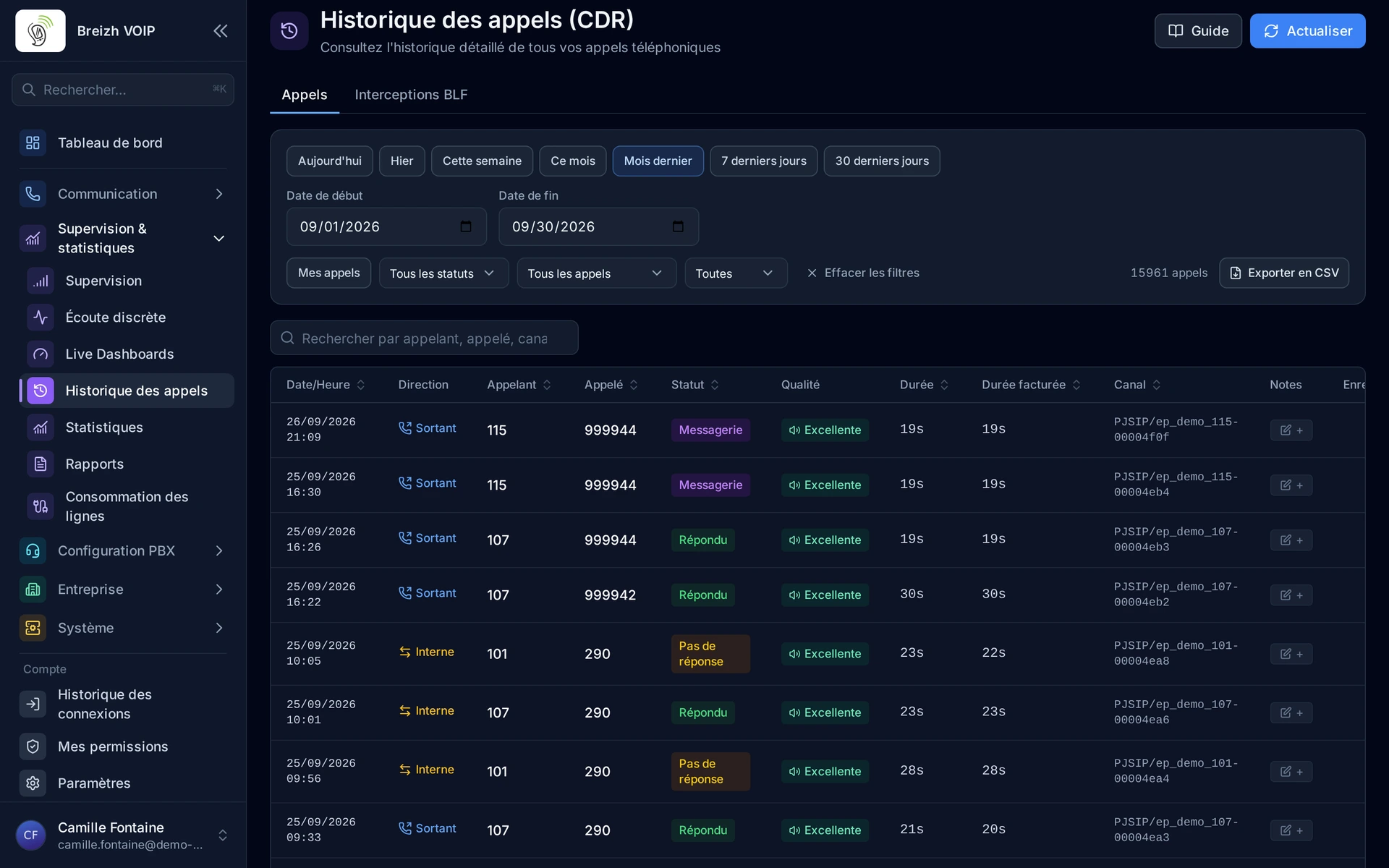
Comprehensive Call Detail Records with advanced multi-criteria filtering, integrated call recording playback, real-time RTP quality metrics (jitter, packet loss, MOS), CSV and PDF export, operator-specific CDR views and a full statistics dashboard for call analytics.
How it works
Every call (inbound, outbound and internal) is automatically logged with full metadata: caller, callee, start time, answer time, end time, duration, disposition and cost
Advanced filtering lets you search by date range, extension, caller/callee number, call direction (inbound/outbound/internal), call status (answered/missed/busy/failed) and duration range
Call recordings are directly integrated: play, pause, seek and download recordings without leaving the CDR view
RTP quality metrics captured from RTCP reports are displayed per call: jitter, packet loss percentage, round-trip time, codec used and estimated MOS (Mean Opinion Score)
LinkedId grouping connects all call legs (transfers, conferences, queue hops) into a single logical call view so you can trace the complete journey
Operator CDR views provide dedicated filtered views for operators and receptionists showing only their relevant calls with simplified actions
CSV export generates detailed spreadsheets with all CDR fields for accounting, billing reconciliation and custom reporting
PDF export produces formatted call reports suitable for client invoicing, audit submissions and management presentations
Statistics dashboard aggregates CDR data into visual charts: call volume over time, average duration, peak hours, top callers, top destinations and success rates
Real-time CDR updates show calls as they happen with live duration counters and status indicators
Use cases
- Accounting teams exporting monthly CDR data as CSV for billing reconciliation and cost allocation per department
- IT administrators investigating call quality issues by reviewing RTP metrics (jitter, packet loss, MOS) per call
- Compliance officers pulling PDF call reports with recording access for regulatory audits
- Sales managers analyzing call volume trends, peak hours and agent performance through the statistics dashboard
- Operators using dedicated CDR views to review their own call history and quickly callback missed calls
- Support supervisors tracing multi-leg calls (transfers, queue hops) through LinkedId grouping to understand the full customer journey
- Finance departments generating per-client or per-department cost reports using advanced filtering and export
- Quality assurance teams correlating call recordings with RTP quality scores to identify infrastructure issues
Benefits
- Advanced multi-criteria filtering: date, extension, direction, status, duration and free-text search
- Integrated call recording playback directly within the CDR interface
- Real-time RTP quality metrics: jitter, packet loss, round-trip time, codec and MOS score per call
- CSV export for billing, accounting and custom data analysis
- PDF export for formatted reports, client invoices and audit documentation
- Operator-specific CDR views with simplified interface and one-click callback
- Statistics dashboard with visual charts: call volumes, peak hours, duration trends, top destinations
- LinkedId call grouping to trace multi-leg calls across transfers, queues and conferences
- Real-time CDR updates showing live calls with duration counters
- Complete traceability of every call for legal and regulatory compliance
Configuration
- Retention period
- Configure how long CDR records are retained. Default is unlimited. Set a retention policy to comply with data protection regulations.
- Recording association
- Enable automatic linking of call recordings to CDR entries. Recordings become playable directly from the CDR interface.
- RTP quality tracking
- Enable capture of RTCP quality metrics (jitter, packet loss, MOS) for each call. Requires AMI reporting permission on the connection.
- Operator view
- Enable dedicated CDR views for operators and receptionists with filtered results and simplified actions.
- Export formats
- Configure available export formats (CSV, PDF) and default field selection for each export type.
Examples
- Monthly billing export: filter CDR by date range and department, export as CSV with cost columns for accounting to reconcile against carrier invoices
- Quality investigation: filter calls with MOS below 3.5, review RTP metrics to identify network issues, correlate with jitter and packet loss spikes
- Compliance audit: generate a PDF report of all recorded calls for a specific client over the past quarter, including duration, participants and recording links
- Sales performance review: use the statistics dashboard to compare call volumes and answer rates across sales team members over the past month
- Customer journey trace: look up a caller number, see every leg of their call (IVR, queue, transfer, final agent) grouped by LinkedId in a single timeline view
In the panel
Read the guide: Retrouver un appel dans l'historique
Related features
Statistics and dashboards
Knowing what happens on the phone, without keeping a notebook.
Call recording
Keep what was said, when it matters. Recording starts by your rules or at the press of a button during the conversation, and turns up…
Call notes
Write during the call what you would have forgotten ten minutes later.
Use this feature
Tell us what you need and we will put together your quote with you.