 BreizhVoIP
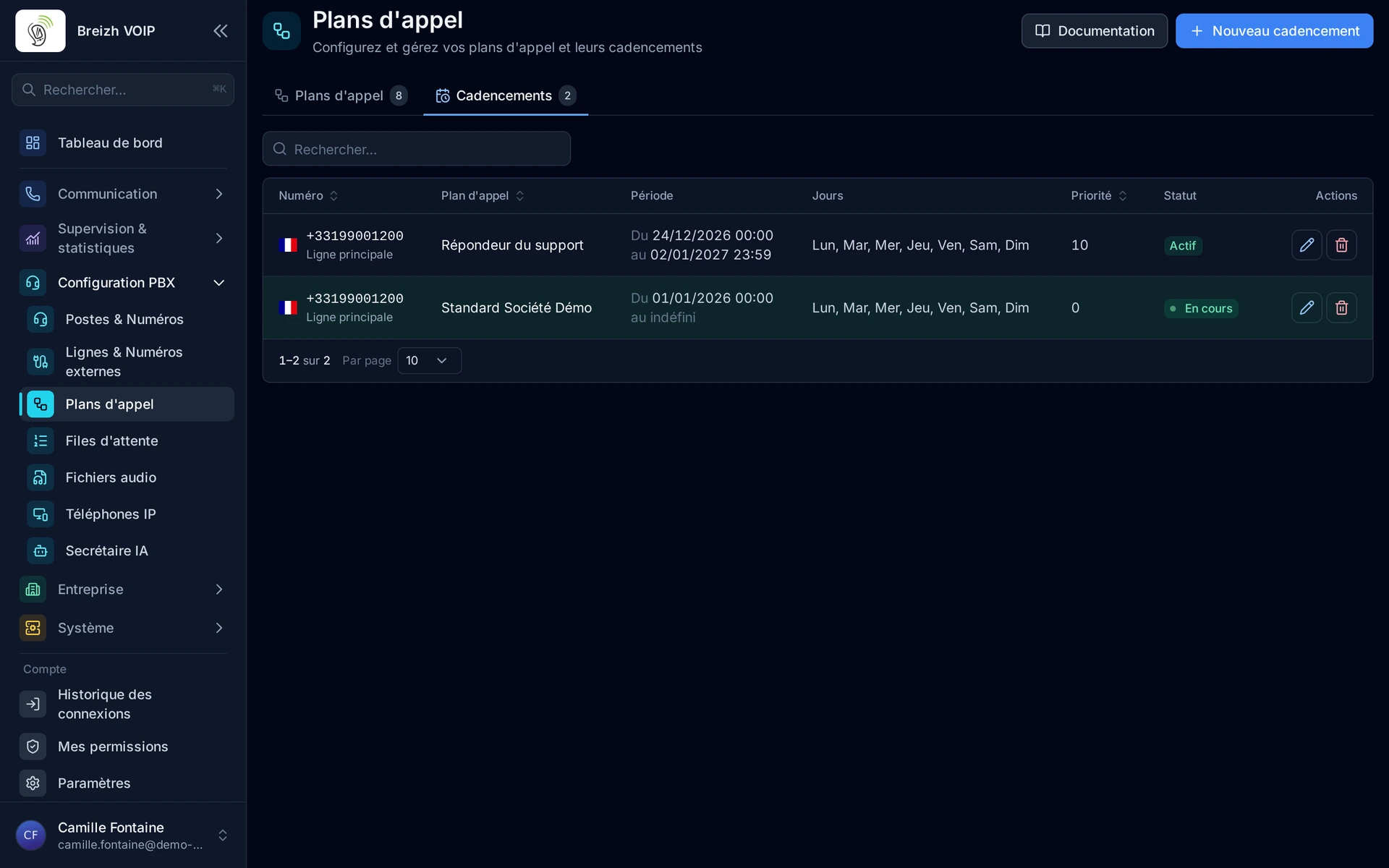
Number scheduling
Scheduling system to associate an external phone number with a dialplan with temporal constraints (dates, hours, days of the week). Allows routing incoming calls to different dialplans according to periods.
How it works
Association of an external phone number with a dialplan
Activation period configuration: start date and end date (optional)
Selection of days of the week when scheduling is active
Priority management: if multiple schedules are active, the one with highest priority is used
Configurable timezone for each schedule
Manual activation/deactivation of schedules
System automatically checks which schedule is active on incoming call
Execution of dialplan associated with active schedule
Or direct association with an internal number: its extensions ring, without a dialplan
Use cases
- Route calls according to hours: "open" dialplan on weekdays, "closed" dialplan on weekends
- Temporary campaigns: special dialplan for limited period (e.g., Christmas promotion)
- Multi-site management: different dialplans according to timezones
- Seasonal routing: change dialplan according to periods of the year
- Tests and progressive deployments: activate new dialplan at specific date
- Holiday management: special dialplan for holidays
- Direct line: a salesperson’s number rings on their extension, with no dialplan to build
Benefits
- Unlimited scheduling per number
- Flexible planning with start and end dates
- Priority management for complex scenarios
- Timezone support
- Simple activation/deactivation
- Automatic routing of incoming calls
- Schedules managed from the panel
Configuration
- Phone Number
- The external phone number that will receive incoming calls. This number must be configured in the "External Numbers" section.
- Dialplan
- The dialplan that will be executed when the schedule is active. The dialplan defines the call flow (IVR, redirects, messages, etc.).
- Start Date and Time
- The date and time from which the schedule becomes active. The schedule will not be used before this date.
- End Date and Time
- The date and time until which the schedule remains active. If left empty, the schedule is active indefinitely (until manual deactivation).
- Days of the Week
- The days when the schedule is active (Monday, Tuesday, Wednesday, etc.). The schedule is active all day for selected days.
- Priority
- The schedule priority (number between 0 and 15). If multiple schedules are active at the same time for the same number, the one with the highest priority is used.
- Timezone
- The timezone used to calculate dates and determine days of the week (e.g., Europe/Paris, America/New_York). Useful for multi-site businesses.
- Destination
- A dialplan, or an internal number whose extensions ring directly. If that number is personal, its holder’s forwarding also applies to calls from outside.
- While ringing
- For an internal number: what the caller hears while the extensions ring. The internal number's own setting, a ringtone, or another music on hold.
Examples
- Number +33123456789: "Open" dialplan Monday to Friday, "Closed" dialplan on weekends
- Promotional campaign: "Christmas Promo" dialplan from December 1st to 31st, then back to normal dialplan
- Multi-sites: "France Site" dialplan in French time, "USA Site" dialplan in American time
- Progressive deployment: New dialplan activated January 1st at midnight
- Direct number of a salesperson: a permanent schedule to their internal number, and their personal forwarding follows them during meetings
In the panel
Read the guide: Diriger un numéro vers le bon plan d'appel
Related features
Visual dialplans with modules
Drawing a call's path instead of describing it to an engineer.
Your phone numbers
Keep your numbers, or take new ones. Keeping your existing numbers is free with your RIO code: we prepare the file, you sign the mandate…
Call forwarding
Everyone decides where their calls go when they cannot answer: all calls, the ones they miss, depending on their status, or during an…
Use this feature
Tell us what you need and we will put together your quote with you.