 BreizhVoIP
Redirect
Redirect a call to one or more extensions. The system calls all extensions in parallel and the first to answer receives the call.
How it works
Pick the extensions to call: phone line phone accounts, internal numbers, or both
The system rings every extension at once, in parallel
Whoever picks up first takes the call; the other legs are cancelled automatically
If nobody answers within the configured timeout, the call leaves through the "timeout" output
If every extension is busy, the call can leave through an "all busy" output
Each extension can have its own output when it answers, so you can route by who picked up
Use cases
- Transfer a call to one specific agent: a single extension, straight through
- Build a ring group: several extensions ring together, the first one free answers
- Customer service with several agents: ring 3 or 4 extensions at once to cut waiting time
- A department with several desks: every phone rings, whoever is free takes the call
- Fallback strategy: try the main extension first, then a backup extension if it fails
What you configure
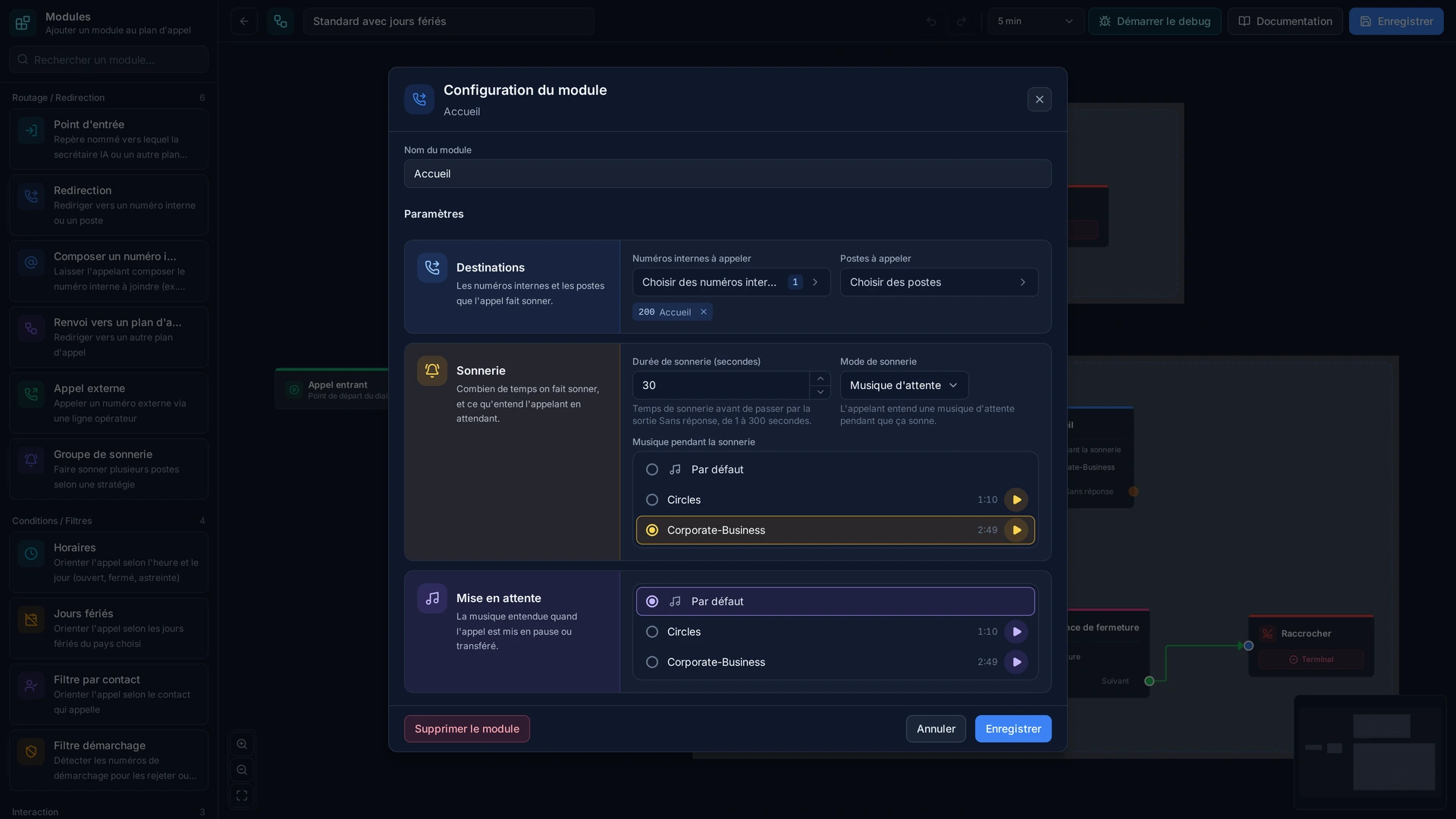
- Internal extensions
- The internal extensions (3- or 4-digit numbers) to ring in parallel. For example 101, 102, 103 to build a ring group.
- Phone accounts
- The phone line phone accounts to ring in parallel. These accounts are set up under "Extensions".
- Timeout
- How long to ring, in seconds, before the call counts as unanswered (30 seconds by default). Past that, the call leaves through the "timeout" output.
- Ring mode
- What the caller hears while waiting: "ring" for a normal ringing tone, or "moh" for hold music. Hold music is easier on a caller who waits.
Examples
- Example 1, Sales ring group: ring extensions 101, 102 and 103 (three salespeople) at once. The first one free answers. If nobody answers within 30 seconds, the call goes to the 'timeout' output, typically voicemail.
- Example 2, Customer service with a backup: ring extension 201 (main customer service) first. If there is no answer within 20 seconds, ring extension 202 (backup).
- Example 3, Direct transfer: send the call to extension 301 (the director) only. If it is busy, the call leaves through the 'busy' output and hears an unavailable message.
- Example 4, Technical team: ring 401, 402 and 403 in parallel. The first one free takes the call. If all are busy, the call goes to a queue.
In the panel
Read the guide: Envoyer un appel vers un poste précis
Modules in the same category
Dialplan Redirect
Redirect to another dialplan. Allows creating reusable and modular dialplans by transferring execution to another routing.
External Routing
Route a call to an external number (landline or mobile) via a configured trunk. Ideal for outbound calls and routing to external numbers.
Dial by Alias
Dial an internal alias to reach a station. Allows users to call a colleague directly by dialing their alias number, without knowing the technical extension.
Ring Group
Ring multiple stations simultaneously or sequentially. Configure advanced ringing strategies to distribute calls within a group of stations.